Text component

Use the Text component to add text to your report, for example, as a block of explanatory text or as a subtitle for a chart component. Adjust the color, size, alignment and style of font. Embed links to other reports or web pages.
The Text component provides a full text WYSIWYG editor that you can use to enter your text. Using the text editor, you can format your report with:
- Bold, italic and underlined text
- Superscript and subscript text
- Bulleted text
- Left, center and right-aligned text
- Hyperlinked text
- Custom fonts
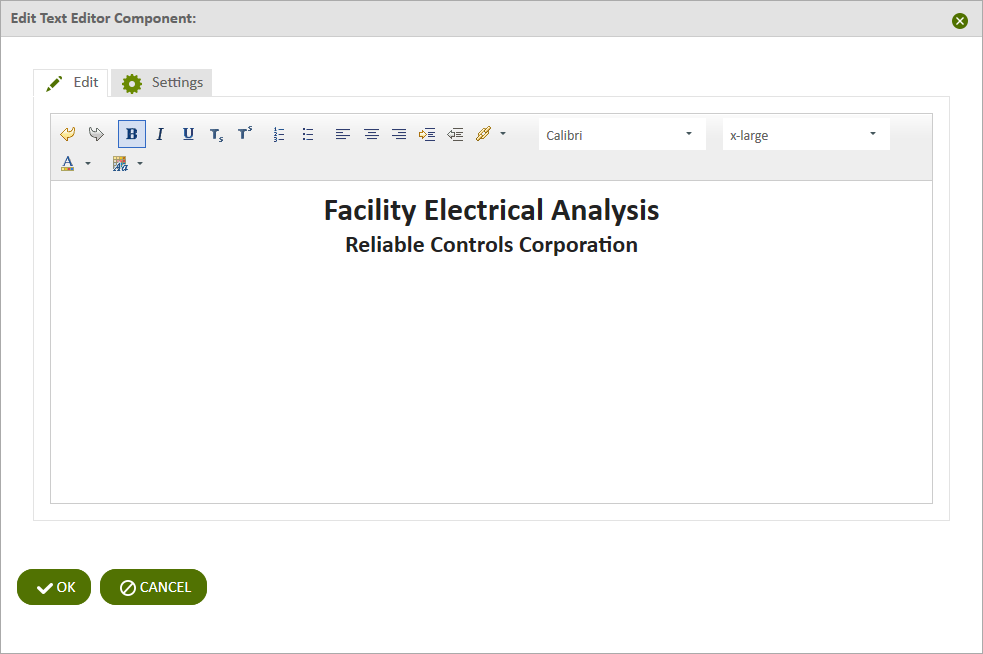
Figure: Text component
Use the following steps to add text to a report:
- Add a Text component to a report and click the component's Edit
 icon in the component's banner.
 - Click Edit in the menu.
- On the Edit tab of the Edit Text Component page, type the text to display.
- Use the controls in the menu bar to apply formatting to your text.
- Click OK.
© 2019 Reliable Controls Corporation. All rights reserved. Published October 29, 2019