Identifier Selector
When a component in a report includes one or more Data Sets, a drop-down list box is automatically added to the top of the report. This list box is the Identifier Selector. (See Creating a Data Set for information about creating the identifiers that are in the list.)

Figure: Identifier Selector at the top of a report layout
When you select a point's identifier in this list, the components in the report are automatically updated to show the data associated with that identifier. For example, if the Data Set includes point identifiers for rooms, the Identifier Selector lists those room identifiers. As shown in the following images, when you select Rm237 in the list, the Date Range component chart shows the values for Room 237. When you change the selection to Rm241, the chart is updated to show the values for Room 241.
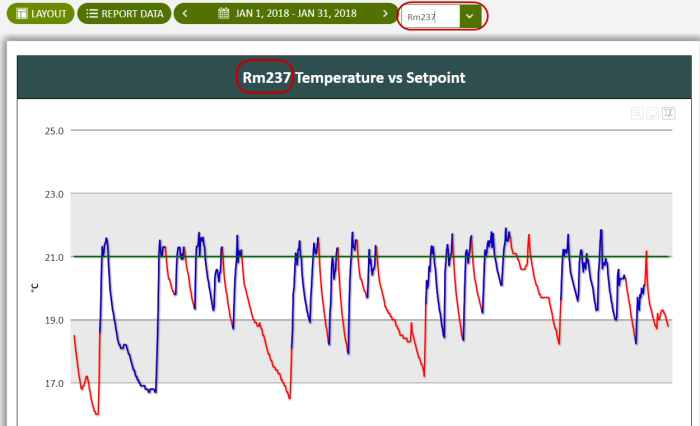
Figure: Selecting room identifier Rm237 in the Identifier Selector shows the chart for that room
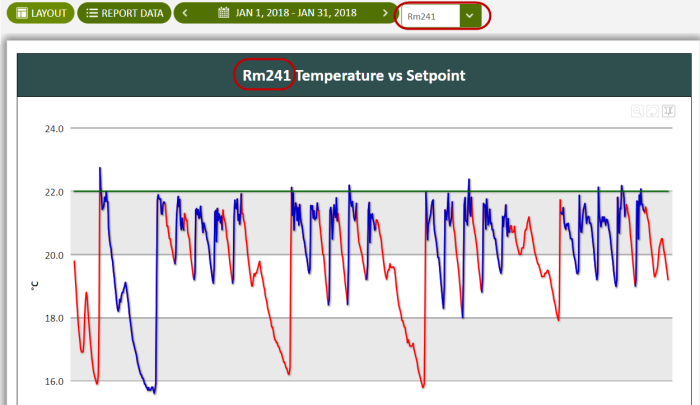
Figure: Changing the room identifier to Rm241 in the Identifier Selector shows the chart for that room
© 2019 Reliable Controls Corporation. All rights reserved. Published October 29, 2019