The Manage Points page
The points list displays all the points in RC-Reporter that are available to be added to reports. The points list is composed of data sourced from connected RC-Archive databases and imported spreadsheet files.
Access the points list in two ways:
- In the menu bar, click Data > Points to open the Manage Points page.
— or —
- On a Report Data page, select Points in the drop-down list and click Go to open the Choose Points dialog box.
The Manage Points page:
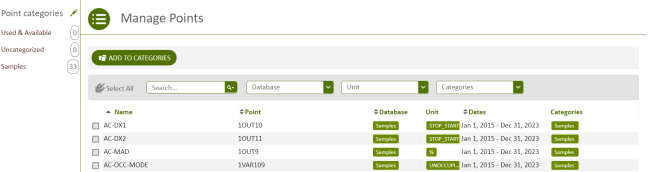
Figure: Points listed in the grid area on the Manage Points page
The grid on the Manage Points page contains the following columns:
Name
The name of the point.
Point
The mnemonic of the point.
Database
The database that the point is sourced from.
Unit
The unit of the point. The unit for the point is sourced from the controller database.
Dates
The inclusive time range data for the point's data, including the time and date of the first data that was collected, to the time and date the last data was collected.
Categories
The categories that the point belongs to.
© 2019 Reliable Controls Corporation. All rights reserved. Published October 29, 2019